Voice Changer - One of the Best Voice Changer Apps for Android

If you are searching for a good voice changer app than stop. Voice Changer for Android will offer you many entertaining solutions which will offer wide variety of choices to change your voice. .

Aquilon Software Review - One of the best ERP software that can take your business to another level

That is why today we will talk about one of the best in the business software niche – Aquilon Software. It is a software that earned critical acclaim due to its features and functionality. Companies widely use it for Enterprise Resource Planning (ERP).

4 Travel Apps For Your Smartphone That Are Useful Anytime

Travel apps have been constantly popular on these devices ever since their inception, but these days they’re so good that they’re actually useful even when you’re not desperately trying to have fun on vacation.

Game of the Day - Flapping Dragon Hidden Mushroom

If you are nostalgic about Flappy Bird then you definitely should try the cutest Flappy Dragon of all times.

Create and use your shopping lists in extremely easy manner with ListOnGo Shopping List

Android app that will make the creating of shopping lists very easy and simple.

Showing posts with label MobileSync App. Show all posts

Wednesday, November 1, 2017

Android Tool of the Week - MobileSync App


There are nearly three million apps in the Google Play Store. That’s a lot of apps. But we always try to share with you the best of the bunch, so likewise today, as our Android Tool of the Week, we present to you an amazingly useful app for file and text transfer. This great app that caught us our attention is called MobileSync App. Read the following review and learn how to use it.

What is this app exactly?

Using this highly efficient and effortless app, users can easily and fast transfer any type of file from their android to their Windows computer without using cable, automatically over their WIFI connection. With the app’s help, users can transfer files as photos, videos, text, and more between their Windows and their smartphone. The app is developed for android users, very easy for using, offering its users to communicate with the MobileSync Station on their Windows. The app is requiring setup only once and there is no need for IP address copying or QR scan for every operation of sending and receiving files. Using the app, multiple devices can sync and transfer files.

Why do we love this app?

The MobileSync App is very practical and simple tool that allows users to send any type of file using their WIFI connection to transfer files from their android to their Windows fast and easy, automatically. Without any cables, the app allows users to drag and drop files to the operation in the MobileSync Station on their Windows. With this app, users are allowed to use the app’s Watch folders to detect and put new files in the app’s send list to easily transfer them to the Windows’ MobileSync Station. No need of USB cables, just with WIFI connection, the app does not require turning on the WIFI hotspot or Ad-Hoc mode, without limit of the file size or the time for file transferring.

Download this app on Google Play now for free.

Official Website: MobileSync App


Google Play Download Link: MobileSync App
Sunday, October 22, 2017

MobileSync App – Light-Weight App for Carrying Out Automatic Files & Text Transfer


The fact still remains that Bluetooth file transfer process is as slow as snail. Mainly, our Bluetooth services can be convenient when it comes to transferring files such as images, music etc. But once it reaches the phase of sending a large file by using the Bluetooth medium, this can take hours. Because of that, nowadays, you can use an app for quick transfer of files to your pc without any cables. We discovered an app that is great for this. Let’s see what the app offers you.

What is this app exactly?

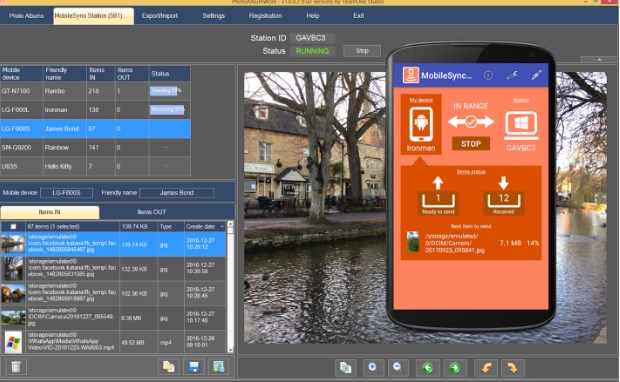
Using this highly efficient and effortless app, users can easily and fast transfer any type of file from their android to their Windows computer without using cable, automatically over their WIFI connection. With the app’s help, users can transfer files as photos, videos, text, and more between their Windows and their smartphone. The app is developed for android users, very easy for using, offering its users to communicate with the MobileSync Station on their Windows. The app is requiring setup only once and there is no need for IP address copying or QR scan for every operation of sending and receiving files. Using the app, multiple devices can sync and transfer files.

Why do we love this app?

The MobileSync App is very practical and simple tool that allows users to send any type of file using their WIFI connection to transfer files from their android to their Windows fast and easy, automatically. Without any cables, the app allows users to drag and drop files to the operation in the MobileSync Station on their Windows. With this app, users are allowed to use the app’s Watch folders to detect and put new files in the app’s send list to easily transfer them to the Windows’ MobileSync Station. No need of USB cables, just with WIFI connection, the app does not require turning on the WIFI hotspot or Ad-Hoc mode, without limit of the file size or the time for file transferring.

Download this app on Google Play now for free.

Official Website: MobileSync App


Google Play Download Link: MobileSync App