Showing posts with label Files. Show all posts
Wednesday, February 28, 2018
Config - Professional, User Friendly, Hassle-Free SaaS Platform
3:50 PM
Config, File Management, Files, Managing, Software
The era of installing software from a CD or from a datacenter’s server is coming to a close, as internet-delivered software makes applications available anywhere, anytime
One of the most popular forms of cloud computing is software-as-a-service (SaaS), defined as a software distribution model in which a service provider hosts applications for customers and makes them available to these customers via the internet. While the technology world is laser focused on the software-as-a-service (SaaS), or “cloud,” phenomenon, a lot of companies still aren’t as familiar with it. That’s changing, however, as SaaS solutions continue to offer a viable software option for many businesses to traditional on-premise installations. Every day at Software Advice, we hear the same handful of questions about what SaaS is, exactly, and how SaaS differs from the traditional software model. So, we thought it’d be helpful to bring Config, one of the best SaaS – software distribution models out there to your attention.
What exactly is Config?
Config is a SaaS – software distribution model for managing configuration files. Config is a new SaaS company, created in 2017, that is looking for different ways to help simplify the methods of storing and accessing configurations used by apps, modules, systems, environments, server instances and it runs in both public and private environments. Config supports proprieties stored within INI, XML, JSON, YAML and TOML configuration files and includes variety of different feature which will make the lives of programmers, sysadmins and IT managers much easier. With the Config SaaS platform they can manage configuration files across all of their systems, apps, environments and instances, while synchronizing common configuration, using environment variables and viewing differences between the environments. It is a SaaS solution with amazingly easy to use web interface and there is no infrastructure required.
Easy to use, hassle free configuration management
Config offers IT professionals a hassle free configuration management. It comes with version control, which means it supports semantic versioning, change history, change notifications and locking. If they work within a team, Config helps them track configuration changes made by other team members and they will be notified by email for every change made, or they can view the change history. They can also review and approve configuration changes on locked-down environments. With its useful and versatile features Config will help its users design more configurable apps. Users can also get or grant temporary access to configuration on locked down environments which is a useful option for debugging purposes. Also securely sharing configuration with all sensitive data hidden within a few clicks is available. Users can encrypt all the sensitive configuration values they need hidden. Config does not require any additional infrastructure for setup and maintenance. The Config SaaS platform comes with multiple different plans with different prices and features available. You can look them up on their official website for more information and details.
If you decide to look more into the Config SaaS platform and give it a try, you can find more detailed information on their official website www.configapp.com!
Official Website Link: Config
Saturday, February 11, 2017
Daily App Recommendation - Viper FTP
8:03 PM
Daily App Recommendation, Files, Transfer, Viper FTP
OS: Mac OS X
Price: FREE & Paid Version
What it is?
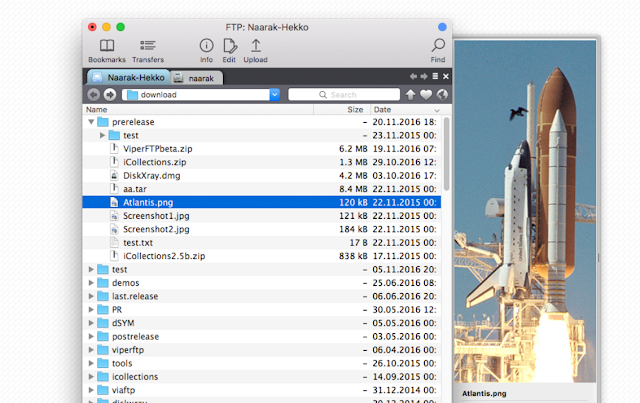
Viper FTP allows users to transfer files by FTP, SFTP, WebDav or Amazon S3. If users maintain a website, upload documents or photos, or if they upload movies to a YouTube account and they want it done quickly and easily
Who is it for:
- Users that want to transfer files fast and securely
- Users that want to transfer files or upload documents
Standout Features:
2. Monitors everything you have done and keeps a record
3. Bookmark your personal, work and social upload servers via FTP.
4. Viper FTP provides high secure AES-256 encryption
5. Search and find features and much more
Most relevant App Store/Google Play review:
"This does the job flawlessly. Great safe file transfer. Wouldn't change it ever!"
Website download link: Viper FTP
Sunday, January 29, 2017
Apps Locker is the wonderful app that will protect your Smartphone from intruders
The security of a smartphone is something that should be taken very seriously. Android OS does allow users to add a passcode lock to the lock screen, but many users find it very inconvenient and would rather risk their data getting into the wrong hands than enter the PIN or pattern lock every time. Majority of us use email and other messaging apps on our mobile devices, which contain sensitive data that we would not want others to access. What if you could just password protect specific apps such as Gallery, Messages, etc.? The Google Play Store has some decent tools that password protect specific apps so you do not have to lock the entire device. Past the break, we have compiled this review for an app from this genre. We are talking about, Apps Locker.
What is Apps Locker?
Apps Locker is the wonderful app that will protect your Smartphone from intruders. You can apply the pattern lock for apps that are installed on your Android device and whenever you install new app to your deice it will automatically ask you for either you want to protect it by this app or not. This will deny the access from the authorized users.
It also ask you for the security question at the start which is the best option if you have forgotten the password as by entering the answer for that security question you can recover your password. Moreover, you can also hide the app icon from application menu and if you want to access it later, it is very easy to unhide.
The main aim of the app is to protect your Android apps from wrong hands and the app is succeeded in its intention. The app looks good with color combinations, easy to navigate and very easy to use. It is one of the best apps to protect your Android device sensitive data. Direct download links to the app are given at the end.
Google Play Download Link: Apps Locker
Google Play Download Link: Apps Locker PRO
Subscribe to:
Posts (Atom)